
Salesforce Multi-Carrier Shipping App for FedEx, UPS, USPS, DHL, Purolator and more. Shipping, tracking and returns built natively on Salesforce. Trusted by 100+ customers, Astonous Ship runs natively on Salesforce, connecting shipping operations with customer data to streamline fulfillment and improve delivery experiences.
.png)

















































Astonous Ship supports all major carriers, including top freight carriers like XPO, RoadRunner, and Southeastern Freight Lines.

.png)

Create Labels, Manage Returns, Estimate Costs, and Track Deliveries effortlessly with Astonous Ship
100% Salesforce-Native Multi-Carrier Shipping App: create labels, manage returns, estimate costs, and track shipments seamlessly. Astonous Ship integrates Salesforce with major shipping carriers to simplify shipping operations inside your CRM, including top freight carriers like XPO, RoadRunner, and Southeastern Freight Lines.
Rating on AppExchange
Reviews on AppExchange
Subscribers across the Globe
Seamless Shipping within Salesforce: Create Labels, Manage Returns, Estimate Costs, and Track Deliveries effortlessly with Astonous Ship.

Generate shipping labels from any object. You can search recipient across any object in Salesforce
.png)
Calculate rates from any object and compare rates before creating shipments.

Generate Return Labels from cases or any other object. Track returns in real-time.

Shipping status is automatically updated every hour. Send branded tracking emails and expose shipment updates via Communities or Commerce Cloud.

Get live carrier tracking updates automatically synced to every
shipment record. View delivery status in real time directly inside
Salesforce without switching tabs or logging into carrier portals.

All shipments information is stored in Salesforce so you can leverage Salesforce Reports and dashboard capabilities.
1. Generate FedEx, UPS and USPS Shipping Labels from Account, Opportunity, Order or any Salesforce object.
2. Calculate shipping rates on any object.
3. Auto-fill shipment information to save time
.png)
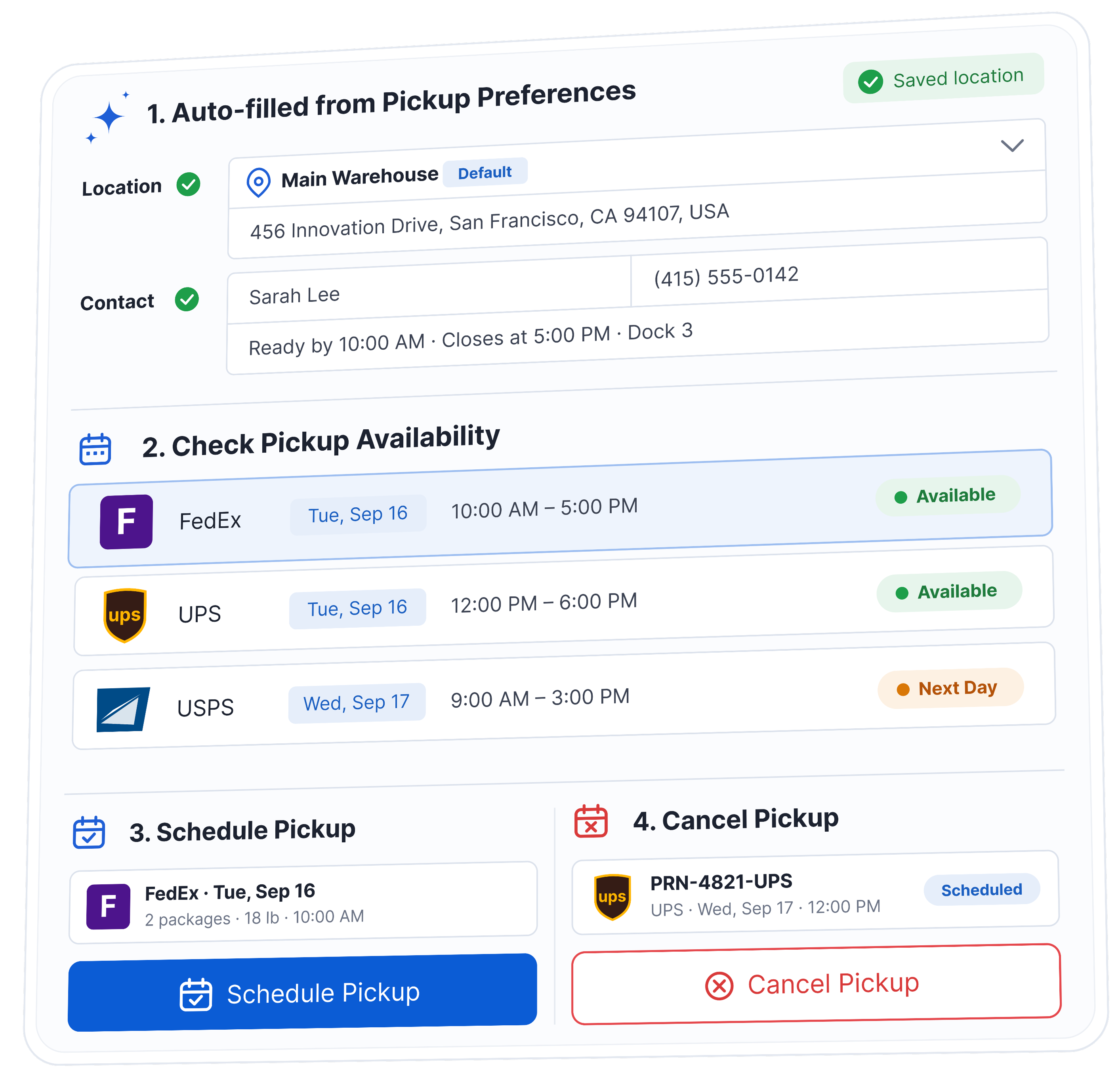
1. Auto-fill pickup information from pre-defined preference/pickup locations.
2. Check pickup availability.
3. Schedule pickups.
4. Cancel pickups.
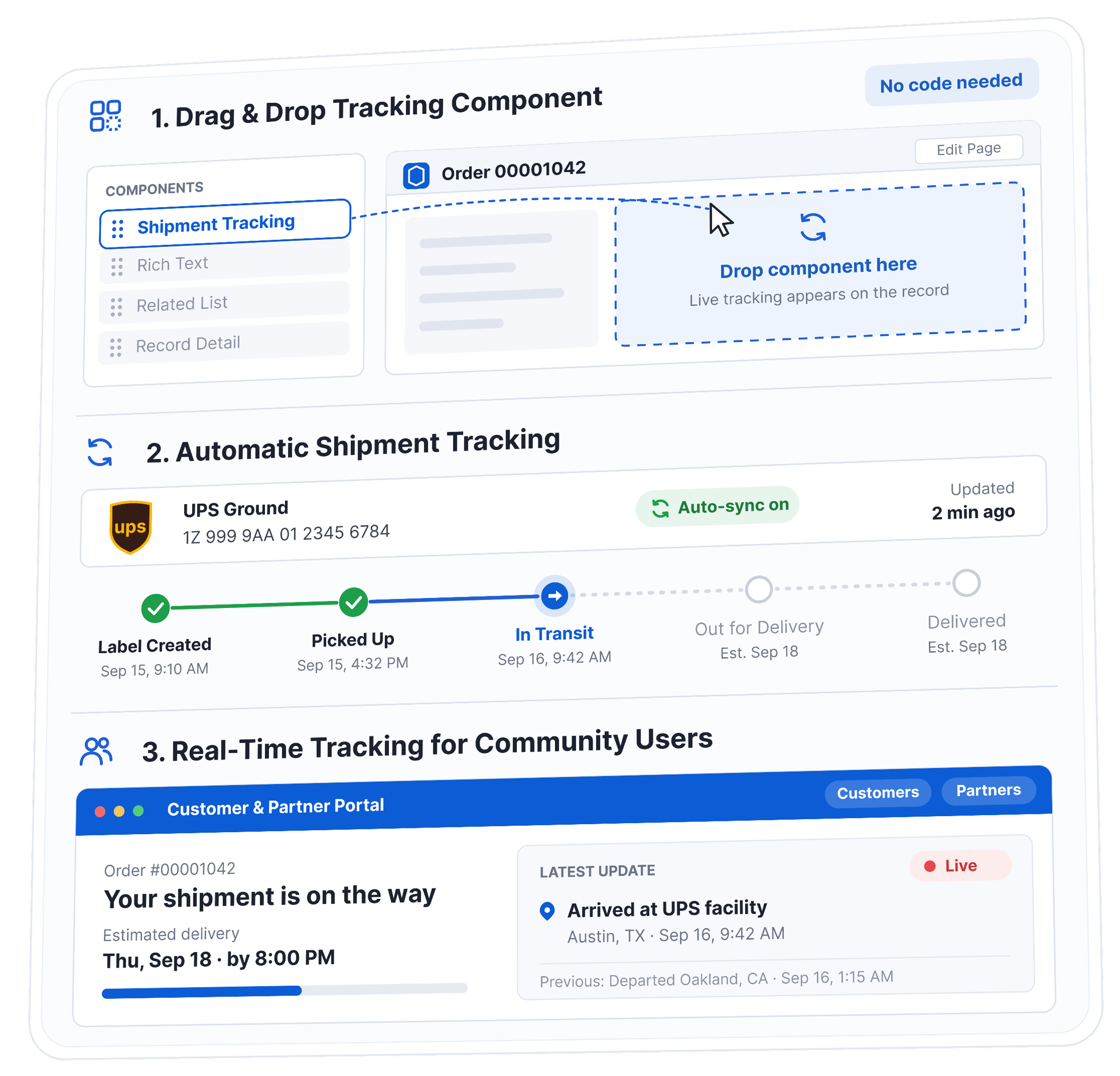
1. Drag & Drop tracking component for real-time tracking data.
2. Automatic shipment tracking.
3. Show real-time shipment tracking
to Salesforce communities Users (Customers or Partners).
Discover how Astonous Ship eliminates manual shipping
Astonous Ship supports the global consolidators, local postal providers, regional providers as well as some freight services. 20+ pre-configured carriers covering FedEx, UPS, USPS, DHL, Purolator, Australia Post, Canada Post + LTL freight via XPO, RoadRunner, SEFL, ready to ship on day one.

.png)


.png)
.png)


Astonous Ship supports the global consolidators, local postal providers, regional providers as well as some freight services. We Support 5+ Freight Carriers.
.png)
.png)
.png)

Watch how Astonous Ship simplifies shipping directly inside Salesforce — create labels, compare carrier rates, manage returns, and track shipments in real time, without ever leaving your CRM

Discover how our solutions have transformed businesses through innovative technology and dedicated support.
.png)
"Astonus has been a great addition to our Salesforce setup. It integrates natively into our existing workflow, so our team can manage shipping without ever leaving the CRM — no clunky exports or switching between systems. Setup was straightforward, and it's clearly built by people who understand how Salesforce actually works day-to-day. Highly recommend for any team looking to streamline shipping directly inside Salesforce."


"We selected Astonous for our Salesforce embedded shipping when a competitor could not meet our need for real-time quoting after we changed carriers. While there were some early hiccups, support was generally very prompt to address our issues."

.png)
"We implemented this shipping integration for both FedEx and UPS and it has been a game changer for our operations. It cut our shipping preparation time by more than half, significantly improving efficiency and workflow. The support team is truly five star they handled the entire setup seamlessly and are extremely responsive whenever assistance is needed."


"Astonous has been a major upgrade from our previous solution, which was outdated, unreliable, and lacked proper support. It offers a much more intuitive interface, robust tracking, and the flexibility we need for evolving logistics. The seamless integrations and highly responsive support team have significantly improved our shipping efficiency and accuracy for both domestic and international operations."

.png)
"Astonous replaced our previous shipping solution with a much better, right-fit system. Their team understood our needs, delivered exactly what we required, and made the transition smooth. Very happy with the results."


"The team was highly supportive and worked closely with us to ensure a great app experience. They respond quickly to any issues and continuously roll out new features, making the overall experience even better."


.png)
Astonous Ship is a Salesforce-native multi-carrier shipping application. It allows users to compare shipping rates, create labels, schedule pickups, track shipments, manage returns, and view shipping information directly inside Salesforce.
Because the application runs within Salesforce, users can create shipments from the records they already work with, without moving information between Salesforce and a separate shipping system.
Astonous Ship supports major parcel, express, postal, and freight carriers, including:
-FedEx and FedEx Freight
-UPS
-USPS
-DHL Express
-Australia Post
-Purolator
-XPO Logistics
-RoadRunner Freight
-Southeastern Freight Lines
-TForce and other supported carriers
Carrier availability may depend on the country, shipping service, and required functionality. Contact Astonous if you need support for a carrier that is not currently listed.
Yes. Astonous Ship is built for Salesforce and works directly with Salesforce records, automation, permissions, reports, and user interfaces.
Shipment data, tracking details, rates, package information, and delivery updates can be stored in Salesforce. This allows businesses to use shipping information in reports, dashboards, Flow automation, customer portals, and other Salesforce processes.
Managing shipping inside Salesforce reduces duplicate data entry and gives sales, service, warehouse, and customer support teams access to the same information.
Users can see the order, customer, shipment, tracking status, delivery date, and related activities from one place. This makes it easier to answer customer questions, automate follow-ups, and understand shipping performance.
Yes. Astonous Ship can retrieve real-time shipping rates from the carriers connected to your Salesforce org.
Users can compare available services, estimated delivery dates, and shipping costs before selecting a carrier. The rates are based on your own carrier account, which means negotiated or account-specific rates can be displayed when supported by the carrier.
Yes. Astonous Ship connects with your company’s existing FedEx, UPS, USPS, DHL, freight, or other supported carrier accounts.
You continue to maintain the commercial relationship with the carrier. Astonous Ship uses the API credentials associated with those accounts to request rates, create shipments, schedule pickups, and retrieve tracking information.
Yes. Users can create shipping labels without leaving Salesforce.
A shipment can be prepared using information already available on the Salesforce record, including the recipient address, package details, selected carrier, service level, declared value, and customs information.
Once the carrier accepts the shipment, the label and tracking number are returned to Salesforce.
Astonous Ship can create shipments from standard and custom Salesforce objects.
Common examples include:
-Orders
-Opportunities
-Quotes
-Cases
-Accounts
-Work Orders
-Return or RMA records
-Accounting and ERP-related objects
-Custom fulfilment or warehouse objects
The application can be configured according to your Salesforce data model and shipping process.
Yes. Astonous Ship is not limited to standard Salesforce Orders.
The application can be configured to create shipping labels and rate estimates from custom objects. This is useful for businesses that manage fulfilment through custom order, warehouse, service, repair, rental, or distribution processes.
Yes. Astonous Ship supports bulk shipping processes.
Users can select multiple Salesforce records and create labels from a list view or configured shipping process. This can significantly reduce the time required to prepare a large number of shipments.
The exact bulk-shipping process can be configured according to your package, carrier, and operational requirements.
Yes. Astonous Ship can regularly retrieve tracking updates from supported carriers and store them in Salesforce.
Tracking information may include:
-Shipment status
-Estimated delivery date
-Actual delivery date
-Tracking events
-Delivery exceptions
-Proof of delivery
-Status notes
This information can be viewed on the related Salesforce record and used in reports or automation.
Yes. Tracking can be configured for standard or custom Salesforce objects.
For example, a business may store the carrier and tracking number on an Order, Case, Return, Purchase Order, or custom shipment record. Astonous Ship can use that information to retrieve tracking updates and display the latest delivery status.
Yes. Astonous Ship can display tracking information through Salesforce Experience Cloud or customer and partner portals.
Portal users can view shipment status, tracking events, expected delivery dates, and related information without contacting the support team. The experience can be configured according to the portal design and user permissions.
Yes. Shipping and tracking information can be used with Salesforce automation to send notifications to customers or internal teams.
Common notifications include:
-Shipment created
-Package picked up
-Shipment in transit
-Out for delivery
-Shipment delivered
-Delivery delayed
-Delivery exception
Notifications may be sent through email, Salesforce activities, field updates, Chatter, SMS integrations, or other configured communication channels.
Yes. Astonous Ship can create prepaid return labels from Salesforce.
Returns can be initiated from a Case, Order, RMA, Return Order, or custom object. This is useful for product returns, repairs, exchanges, warranties, sample returns, and equipment collection.
The return shipment and tracking information remain connected to the original customer or transaction record.
Yes. Depending on the carrier and shipping process, Astonous Ship can create a return label along with the outbound shipment.
The return label can be stored in Salesforce, printed with the shipment, emailed to the customer, or generated later when a return is approved.
Yes. Astonous Ship supports international shipping through supported carriers.
Users can provide information such as:
-Product description
-Quantity and value
-Country of origin
-Harmonized tariff code
-Reason for export
-Duties and taxes payer
-Incoterms
-Commercial invoice details
International shipping requirements vary by carrier, destination country, and shipment type.
Yes. Astonous Ship can generate commercial invoice information for international shipments when supported by the selected carrier and service.
The invoice can use product and shipment information stored in Salesforce. The application can also support paperless trade or electronic trade document processes for compatible carriers.
Yes. Astonous Ship supports selected freight and less-than-truckload carriers, including FedEx Freight and other supported freight providers.
Freight shipping may include:
-Rate estimation
-Pallet and handling-unit details
-Freight class
-Dimensions and weight
-Pickup requests
-Bill of lading information
-Shipment creation
-Tracking
Freight requirements differ from parcel shipping, so configuration is normally reviewed during implementation.
Yes. Astonous Ship can schedule pickups with supported carriers.
Users can provide pickup location, date, time window, package count, weight, and special instructions. The pickup confirmation details can then be stored in Salesforce.
Pickup functionality depends on the carrier and the services enabled for your carrier account.
Yes. When supported by the carrier, Astonous Ship can display estimated delivery dates along with shipping rates.
This helps users compare services based on both price and delivery time. Estimated delivery dates can also help customer service and sales teams set clearer expectations with customers.
Yes. Salesforce automation can be configured to select or recommend a shipping service based on your business rules.
For example, the process may choose:
-The cheapest available service
-The fastest available service
-The cheapest service that meets a required delivery date
-A preferred carrier for a specific region
-A service based on package weight or order value
The final rules depend on your operational and customer-service requirements.
Astonous Ship gives users visibility into rates from multiple carriers before creating a shipment. This allows them to select a more suitable service instead of using the same carrier or service for every shipment.
Shipping data stored in Salesforce can also be used to analyse:
-Spend by carrier
-Monthly shipping costs
-Average cost per shipment
-Service usage
-Delivery performance
-Late or exception shipments
-Carrier performance over time
Actual savings depend on your carrier contracts, shipping volume, package types, and service-selection rules.
Yes. Because shipping information is stored in Salesforce, it can be included in Salesforce reports and dashboards.
Businesses can analyse current shipment volumes, shipping expenditure, carrier usage, delivery performance, late deliveries, exceptions, and other operational measures.
Reports can be configured according to management, warehouse, customer service, or finance requirements.
Yes. Astonous Ship can work with information brought into Salesforce from ERP, accounting, warehouse, e-commerce, and order-management systems.
For example, a Salesforce integration may receive an order from an external system, create a shipment through Astonous Ship, and then send the tracking number and shipping cost back to the original system.
The integration approach depends on the systems involved and the ownership of each data point.
Yes. Astonous Ship can be configured to work with Salesforce-native accounting, ERP, and order-management applications.
Shipping rates and labels can be made available from the relevant transaction or fulfilment records. The specific objects, field mappings, and automation are reviewed during implementation.
A standard implementation can often be completed quickly when the carrier accounts, API credentials, Salesforce records, and shipping requirements are ready.
The implementation timeline depends on:
-Number of carriers
-Salesforce objects involved
-Domestic or international shipping
-Custom field mappings
-Bulk shipping requirements
-Return processes
-Customer portal requirements
-External integrations
-Testing and approval
Astonous provides an implementation plan after reviewing your shipping process.
The setup normally requires:
-Access to the Salesforce org
-Carrier account details
-Carrier API credentials
-Shipping origin addresses
-Package types and dimensions
-Salesforce objects used for shipping
-Address and product field mappings
-Preferred carrier services
-International shipping requirements
-User access and permission requirements
Astonous helps guide your team through the carrier connection and Salesforce configuration process.
Day-to-day users do not need to understand APIs or Salesforce development.
Once the application has been configured, users can compare rates, select a service, create labels, schedule pickups, and track shipments through the Salesforce interface.
Salesforce administrators may be involved when new objects, fields, automation, or shipping processes need to be added.
Carrier credentials are configured using secure Salesforce capabilities and are made available only to authorized processes and users.
The exact setup may vary by carrier and authentication method. Access should follow Salesforce security practices, including appropriate permissions, restricted administrative access, and secure credential management.
Yes. Astonous Ship can be configured for businesses that use different carrier accounts, shipping locations, departments, brands, or business units.
The correct carrier account or origin address can be selected based on the user, warehouse, company, region, order, or other Salesforce information.
Yes. Businesses can configure multiple sender addresses and shipping locations.
The shipment origin can be selected manually or automatically based on the warehouse, inventory location, business unit, record owner, region, or another Salesforce field.
Astonous Ship is generally offered as an organization-level Salesforce subscription rather than charging each Salesforce user separately.
Pricing depends on factors such as:
-Number of carriers
-Required shipping capabilities
-Parcel or freight requirements
-Custom implementation needs
-Support requirements
-Subscription duration
Astonous provides a clear quote after understanding the required carriers and shipping process. Salesforce licences and carrier shipping charges are separate.
A trial can be provided so your team can evaluate Astonous Ship with your Salesforce process and carrier account.
The trial may include application installation, initial configuration, carrier connection, and assistance with a practical shipping use case. Trial scope and duration should be confirmed with the Astonous team.
Standard installation and onboarding support may be included with the Astonous Ship subscription.
Additional charges may apply when the project requires custom Salesforce development, complex integrations, new carrier support, extensive data mapping, or a specialised fulfilment process. Any additional work is discussed before implementation begins.
Astonous provides support for application setup, carrier connections, shipping errors, configuration questions, and product functionality.
Ongoing support may include:
-Troubleshooting carrier API errors
-Adding users or shipping locations
-Updating carrier credentials
-Configuring new Salesforce objects
-Adding shipping automation
-Supporting Salesforce releases
-Reviewing new business requirements
-Adding carriers or services
Yes. Astonous Ship can be configured and extended to match specific Salesforce and fulfilment processes.
Customisation may include new shipping screens, automation, approval processes, object mappings, carrier-selection rules, portal experiences, notifications, external integrations, or industry-specific workflows.
The goal is to use the standard application wherever possible and add custom development only when it provides clear business value.
Yes. Astonous can review your existing shipping application, Salesforce configuration, carrier accounts, shipment data, automation, and business processes.
A migration plan may include:
-Reconnecting carrier accounts
-Replacing existing shipping buttons or components
-Updating automation
-Mapping historical shipment data
-Recreating reports
-Testing labels and rates
-Training users
-Retiring the previous application safely
Because the application runs within Salesforce, users can create shipments from the records they already work with, without moving information between Salesforce and a separate shipping system.
An external shipping platform usually requires users to work outside Salesforce or move order information between two systems.
Astonous Ship works within Salesforce and uses the same customer, order, case, product, and fulfilment information already available in your CRM. This makes shipping part of the Salesforce process rather than a separate operational activity.
It also allows shipping data to participate in Salesforce automation, reporting, security, and customer-service workflows.
Astonous Ship is designed for businesses that want to manage shipping without moving their team outside Salesforce.
It provides:
-Multi-carrier rate comparison
-Shipping label generation
-Automated tracking
-Return labels
-Pickup scheduling
-International shipping
-Freight support
-Bulk shipment processing
-Customer portal tracking
-Salesforce reports and automation
-Support for standard and custom objects
The Astonous team can support the full process, including installation, carrier configuration, Salesforce setup, customisation, integration, testing, training, and ongoing support.
Answer 12 questions about how your team ships today. You get a maturity score, a breakdown across four areas, and the gaps worth fixing first — on screen, in about three minutes.
Prefer to talk instead? Book a demo further down the page.
.png)
.png)
.png)